
SWITCH POUR PÉRIPHÉRIQUES USB 4X1 #F1U401EA - USB Switch BELKIN - Free user manual and instructions
Find the device manual for free SWITCH POUR PÉRIPHÉRIQUES USB 4X1 #F1U401EA BELKIN in PDF.

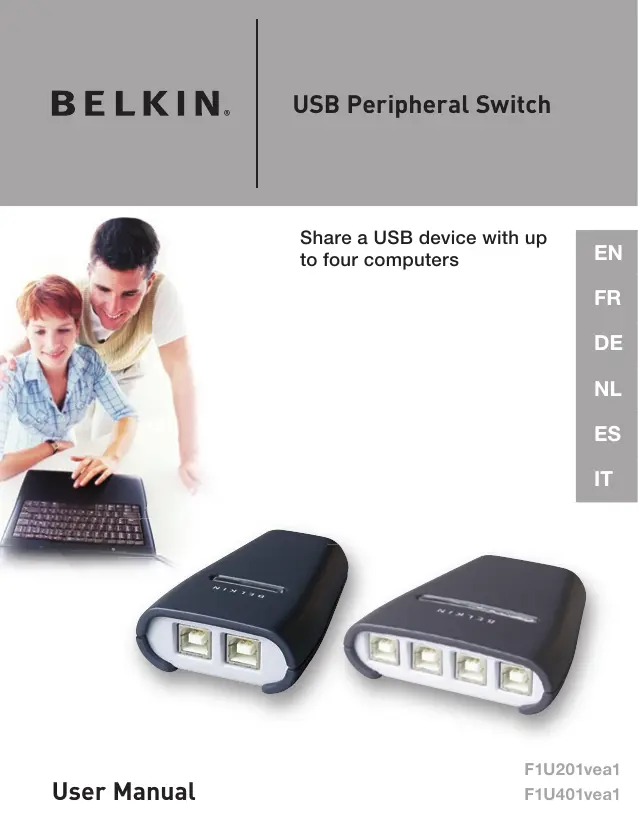


| Product type | USB switch for sharing USB devices |
| Brand | BELKIN |
| Model | F1U401EA (USB switch for 4x1 USB devices) |
| Belkin Reference | F1U401 (also F1U201 for 2 ports) |
| Number of supported computers | 4 |
| Number of shared devices | 1 |
| USB version | USB 1.1 compliant |
| Computer connector | 4 USB type B ports (female) |
| Device connector | 1 USB type A port (female) |
| Power | USB bus-powered |
| LED indicators | 4 LEDs (one per computer) |
| Housing material | High-impact plastic |
| Dimensions (H x W x D) | 27.5 x 82 x 81.25 mm |
| Weight | 31.75 g |
| Operating temperature | 5 to 40 °C |
| Storage temperature | -20 to 60 °C |
| Compatible operating systems | Windows 98 SE, Me, 2000, XP ; Mac OS X.x |
| Warranty | 1 year (Belkin limited warranty) |
| Package contents | Switch, installation CD, user manual, quick installation guide, registration card |
| Switching method | By software (taskbar icon) or keyboard shortcut (CTRL+F11, ALT+F11 on Mac) |
| Special feature | LED indicators to know which computer is using the device (green connected, orange busy) |
| Care and cleaning | Disconnect before cleaning; use a soft, dry cloth; avoid liquids and aerosols |
| Safety | Compliant with FCC Class B, CE, ICES-003; Do not expose to humidity or extreme temperatures |
| Spare parts and repairability | No user-serviceable parts; contact Belkin support if defective |
Frequently Asked Questions - SWITCH POUR PÉRIPHÉRIQUES USB 4X1 #F1U401EA BELKIN
User questions about SWITCH POUR PÉRIPHÉRIQUES USB 4X1 #F1U401EA BELKIN
0 question about this device. Answer the ones you know or ask your own.
Ask a new question about this device
Download the instructions for your USB Switch in PDF format for free! Find your manual SWITCH POUR PÉRIPHÉRIQUES USB 4X1 #F1U401EA - BELKIN and take your electronic device back in hand. On this page are published all the documents necessary for the use of your device. SWITCH POUR PÉRIPHÉRIQUES USB 4X1 #F1U401EA by BELKIN.
USER MANUAL SWITCH POUR PÉRIPHÉRIQUES USB 4X1 #F1U401EA BELKIN
USB Peripheral Switch

natural_image
Two people interacting with a laptop displaying data, no visible text or symbols on the device or backgroundShare a USB device with up to four computers
natural_image
Two black wireless device enclosures with four Ethernet ports, no visible text or symbols on the devices themselves.BELKIN®
USB Peripheral Switch

natural_image
Two people interacting with a laptop displaying data, no visible text or symbols on the device or backgroundShare a USB device with up to four computers
natural_image
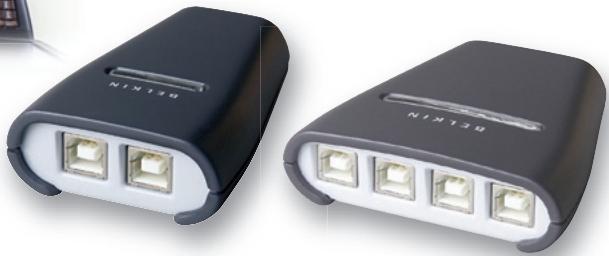
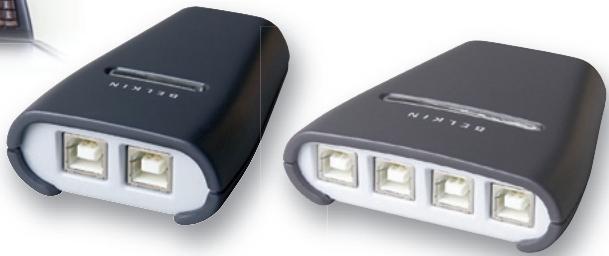
Two black wireless device enclosures with four Ethernet ports, no visible text or symbols on the devices themselves.Congratulations on your purchase of the Belkin USB Peripheral Switch (the Switch). The Switch gives multiple computers access to a single USB 1.1-compliant device—such as a printer, camera, scanner, or an external storage device. The Switch makes peripheral sharing simpler and easier than ever. It offers a convenient design and easy-to-use switching software that gives you immediate access to your USB device. Once connected, your device stays available to all connected computers, eliminating the need for you to unplug and reconnect it to another computer. The Belkin USB Peripheral Switch is backed by a Belkin One-Year Warranty and free technical support.
This manual will provide details about your new Switch, from installation and operation, to troubleshooting—in the unlikely event of a problem.
For easy installation, please refer to the Quick Installation Guide included with your Switch.
Technical Specifications
| Part No.: | F1U201, F1U401 |
| USB: | v.1.1-compliant |
| Power: | BUS powered |
| USB Device Port Connector: | USB Type A Receptacle |
| USB Computer Port Connector: | USB Type B Receptacle |
| LED Indicators: | 4 (F1U401), 2 (F1U201) |
| Enclosure: | High-Impact Plastic |
| Dimensions: | F1U201 27.5 (H) x 58 (W) x 81.25mm (D) |
| F1U401 27.5 (H) x 82 (W) x 81.25mm (D) | |
| Weight: | F1U401 0.07 lbs. |
| F1U201 0.05 lbs. | |
| Operating Temp: | 41° to 104° F (5~40° C) |
| Storage Temp: | -4° to 140° F (-20~60° C) |
| Warranty: | 1 Year |
Package Contents
- Belkin USB Peripheral Switch
- Software Installation CD
- User Manual
- Quick Installation Guide
- Registration Card
System Requirements
- Windows® 98 SE, Me, 2000, XP
- Mac® OS X.x
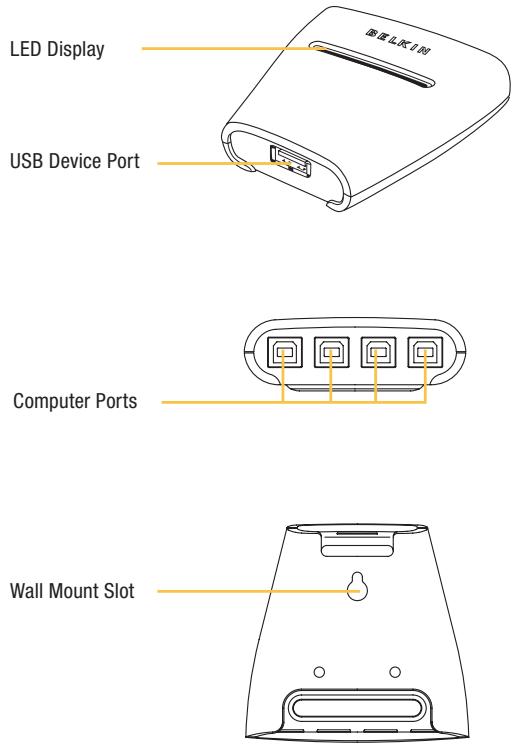
Unit Display Diagrams
Software Installation for Windows
Before you begin, be sure that:
- The Switch is not connected to your computer;
- The Switch supports your operating system; and
- Your USB devices are compatible with your connected computers.
To install the software:
- Place the CD in the CD tray in your PC.
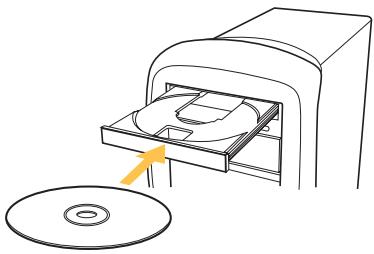
natural_image
Diagram of a CD or DVD scanner with an open disc and a yellow arrow indicating direction (no text or symbols)- Double-click on "My Computer".
- Double-click on the CD-ROM drive.
-
Double-click on the file name "Setup.exe".
-
In order to begin installation, click on "Next".
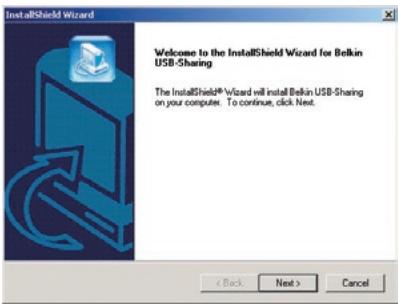
- Setup will install the files in the folder listed under "Destination Folder". To install to this folder, click "Next". To install to a different folder, click "Browse" and select another folder.
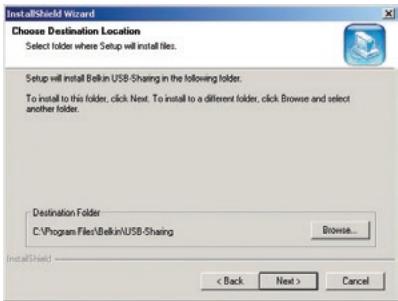
- When the InstallShield Wizard is complete, click "Finish".
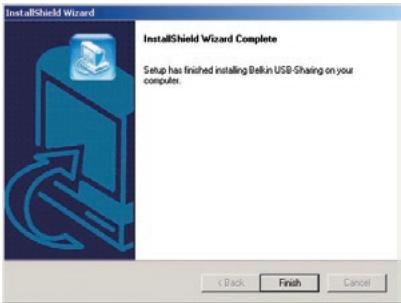
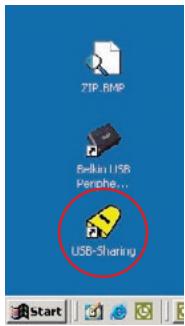
Setup will create a shortcut icon on your desktop.
Hardware Installation
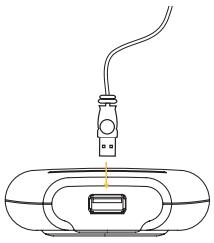
Connecting a USB Device to the Switch
- Connect the A-type connector of your USB device to the A-type USB port on the Switch.
- Install the drivers for your USB device. Refer to the device's user manual for additional information on installing the driver.
natural_image
Line drawing of a device with a plug and cable, no text or symbols presentConnecting Computers to the Switch
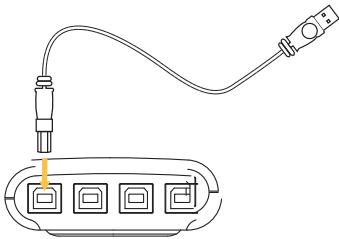
- Connect the USB cable's A-type connector to an available USB port on your USB computer.
- Connect the USB cable's B-type connector to an available port on your Switch.
Repeat steps 1 and 2 for each additional USB computer you wish to connect.
You are now ready to use your Belkin USB Peripheral Switch.
natural_image
Line drawing of a USB cable connecting two ports to an audio jack (no text or symbols)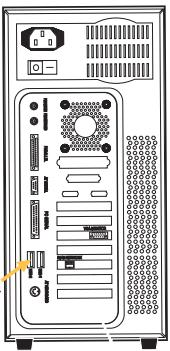
natural_image
Front view of a desktop computer tower with drive bays and ventilation slots (no visible text or labels)Legend

The device is connected to another computer.

The device is currently connected to your computer or the Switch is not properly installed.

Another computer is using the device; the device is not allowed to switch between PCs at this moment (busy status).
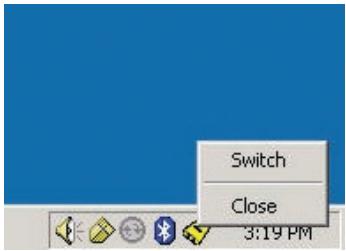
Accessing the USB Device
There are two ways to gain control of the USB device:
- Right-click on the USB status icon on your taskbar and select "Switch".
- Use hot key commands: Ctrl + F11, or for Mac OS, Alt + F11.
You are now able to use the connected USB device.
FCC Statement
DECLARATION OF CONFORMITY WITH FCC RULES FOR ELECTROMAGNETIC COMPATIBILITY
We, Belkin Corporation, of 501 West Walnut Street, Compton, CA 90220, declare under our sole responsibility that the product:
F1U201vea1, F1U401vea1 to which this declaration relates:
Complies with Part 15 of the FCC Rules. Operation is subject to the following two conditions: (1) this device may not cause harmful interference, and (2) this device must accept any interference received, including interference that may cause undesired operation.
CE Declaration of Conformity
We, Belkin Corporation, declare under our sole responsibility that the products F1U201vea1 and F1U401vea1, to which this declaration relates, are in conformity with Emissions Standard EN55022 and with Immunity Standard EN55024, LVP EN61000-3-2, and EN61000-3-3.
ICES
Belkin Corporation Limited Two-Year Product Warranty
Belkin Corporation warrants this product against defects in materials and workmanship for its warranty period. If a defect is discovered, Belkin will, at its option, repair or replace the product at no charge provided it is returned during the warranty period, with transportation charges prepaid, to the authorized Belkin dealer from whom you purchased the product. Proof of purchase may be required. This warranty does not apply if the product has been damaged by accident, abuse, misuse, or misapplication; if the product has been modified without the written permission of Belkin; or if any Belkin serial number has been removed or defaced.
THE WARRANTY AND REMEDIES SET FORTH ABOVE ARE EXCLUSIVE IN LIEU OF ALL OTHERS, WHETHER ORAL OR WRITTEN, EXPRESSED OR IMPLIED. BELKIN SPECIFICALLY DISCLAIMS ANY AND ALL IMPLIED WARRANTIES, INCLUDING, WITHOUT LIMITATION, WARRANTIES OF MERCHANTABILITY AND FITNESS FOR A PARTICULAR PURPOSE. No Belkin dealer, agent, or employee is authorized to make any modification, extension, or addition to this warranty. BELKIN IS NOT RESPONSIBLE FOR SPECIAL, INCIDENTAL, OR CONSEQUENTIAL DAMAGES RESULTING FROM ANY BREACH OF WARRANTY, OR UNDER ANY OTHER LEGAL THEORY, INCLUDING BUT NOT LIMITED TO LOST PROFITS, DOWNTIME, GOODWILL, DAMAGE TO OR REPROGRAMMING, OR REPRODUCING ANY PROGRAM OR DATA STORED IN OR USED WITH BELKIN PRODUCTS. Some states do not allow the exclusion or limitation of incidental or consequential damages or exclusions of implied warranties, so the above limitations of exclusions may not apply to you. This warranty gives you specific legal rights, and you may also have other rights that vary from state to state.
Belkin Corporation
501 West Walnut Street
Compton, CA, 90220-5221, USA
+1 310 898 1100
+1 310 898 1111 fax
Belkin Ltd.
Express Business Park
Shipton Way, Rushden
NN10 6GL, United Kingdom
+44 (0) 1933 35 2000
+44 (0) 1933 31 2000 fax
Belkin B.V.
Boeing Avenue 333
1119 PH Schiphol-Rijk, Netherlands
+31 (0) 20 654 7300
+31 (0) 20 654 7349 fax
Belkin GmbH
Hanebergstrasse 2
80637 Munich, Germany
+49 (0) 89 143405 0
+49 (0) 89 143405 100 fax
Belkin SAS
130 rue de Silly
92100 Boulogne-Billancourt, France
+33 (0) 1 41 03 14 40
+33 (0) 1 41 31 01 72 fax
Belkin Iberia
Avda. Cerro del Aguila 3
28700 San Sebastián de los Reyes, Spain
+34 9 16 25 80 00
+34 9 02 02 00 34 fax
Please visit our website www.belkin.com for technical support or further information.
Disposal of Waste Equipment by Users in Private Households in the European Union:
For more information, go to www.belkin.com/environmental
© 2006 Belkin Corporation. All rights reserved. All trade names are registered trademarks of respective manufacturers listed. Mac OS and Mac are trademarks of Apple Computer, Inc., registered in the U.S. and other countries.
BELKIN®
natural_image
Two people interacting with a laptop displaying data, smiling at the camera (no visible text or symbols)natural_image
Two black wireless device enclosures with four Ethernet ports, no visible text or symbols on the devices themselves.Table des matières
Introduction ....1
Présentation....2
natural_image
Diagram of a CD or DVD scanner with an open disc and a yellow arrow indicating direction (no text or symbols)natural_image
Line drawing of a medical device with a probe inserted into a container (no text or symbols)natural_image
Line drawing of a USB cable connecting two ports to an audio jack (no text or symbols)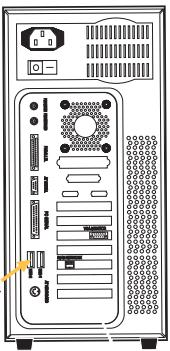
natural_image
Front view of a desktop computer tower with drive bays and ventilation slots (no text or labels visible)Légende

Déclaration FCC
DÉCLARATION DE CONFORMITÉ À LA RÉGLEMENTATION FCC EN MATIÈRE DE COMPATIBILITÉ ÉLECTROMAGNÉTIQUE
501 West Walnut Street
Express Business Park
Shipton Way, Rushden
natural_image
Two people interacting with a laptop displaying data, no visible text or symbols on the device or backgroundnatural_image
Two black wireless device enclosures with four Ethernet ports, no visible text or symbols on the devices themselves.Einleitung ....1
Übersicht 2
natural_image
Diagram of a CD or DVD scanner with an open disc and a yellow arrow indicating direction (no text or symbols)natural_image
Simple line drawing of a device with a bulb and cable, no text or symbols presentnatural_image
Line drawing of a USB cable connecting two ports to an audio jack (no text or symbols)
natural_image
Front view of a desktop computer tower with ports and connectors (no visible text or labels)Übersicht

FCC-Erklärung
501 West Walnut Street
Compton, CA, 90220-5221, USA
+1 310 898 1100
+1 310 898 1111 Fax
Belkin Ltd.
Express Business Park
Shipton Way, Rushden
natural_image
Two people interacting with a laptop displaying data, smiling at the camera (no visible text or symbols)natural_image
Two black wireless device enclosures with four Ethernet ports, no visible text or symbols on the devices themselves.Inhoud
Inleiding....1
Overzicht 2
natural_image
Diagram of a CD or DVD scanner with an open disc and a yellow arrow indicating direction (no text or symbols)NL
natural_image
Line drawing of a device with a plug and cable, no text or symbols presentnatural_image
Line drawing of a USB cable connecting two ports to an audio jack (no text or symbols)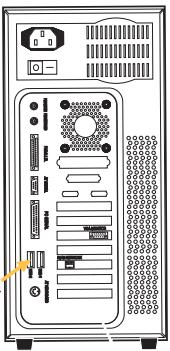
natural_image
Front view of a desktop computer tower with drive bays and ventilation slots (no text or labels visible)Legenda

FCC-verklaring
VERKLARING VAN CONFORMITEIT MET DE FCC-VOORSCHRIFTEN VOOR ELEKTROMAGNETISCHE COMPATIBILITEIT
501 West Walnut Street
Compton, CA, 90220-5221, USA
+1 310 898 1100
+1 310 898 1111 fax
Belkin Ltd.
Express Business Park
Shipton Way, Rushden
natural_image
Two people interacting with a laptop displaying data, smiling at the camera (no visible text or symbols)natural_image
Two black wireless device enclosures with four Ethernet ports, no visible text or symbols on the devices themselves.ES
Introducción....1
Generalidades 2
natural_image
Diagram of a CD or DVD disc being inserted into a device, showing the disc and CD (no text or symbols present)natural_image
Line drawing of a plug inserted into a device with a cable (no text or symbols)natural_image
Diagram showing connections between a cable and an electronic device (no text or symbols present)Leyenda

501 West Walnut Street
Express Business Park
Shipton Way, Rushden
natural_image
Two people interacting with a laptop displaying data, smiling at the camera (no visible text or symbols)natural_image
Two black wireless device enclosures with four Ethernet ports, no visible text or symbols on the devices themselves.IT
Indice
Introduzione....1

natural_image
Diagram of a CD or DVD disc being inserted into a device, with an arrow indicating the disk (no text or symbols present)natural_image
Line drawing of a device with a plug and cable, no text or symbols presentnatural_image
Line drawing of a plug connecting two ports to an audio jack (no text or symbols)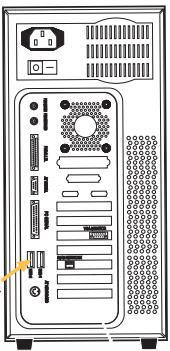
natural_image
Front view of a desktop computer tower with drive bays and ventilation slots (no text or labels visible)Legenda

Dichiarazione FCC
DICHIARAZIONE DI CONFORMITÀ ALLE NORME FCC PER LA COMPATIBILITÀ ELETTROMAGNETICA
501 West Walnut Street
Compton, CA, 90220-5221, USA
+1 310 898 1100
+1 310 898 1111 fax
Belkin Ltd.
Express Business Park
Shipton Way, Rushden
501 West Walnut Street
Compton, CA, 90220-5221, USA
+1 310 898 1100
+1 310 898 1111 fax
Belkin Ltd.
Express Business Park
Shipton Way, Rushden
NN10 6GL, United Kingdom
+44 (0) 1933 35 2000
+44 (0) 1933 31 2000 fax
Belkin B.V.
Boeing Avenue 333
1119 PH Schiphol-Rijk, Netherlands
+31 (0) 20 654 7300
+31 (0) 20 654 7349 fax
Belkin GmbH
Hanebergstrasse 2
80637 Munich, Germany
+49 (0) 89 143405 0
+49 (0) 89 143405 100 fax
Belkin SAS
130 rue de Silly
92100 Boulogne-Billancourt, France
+33 (0) 1 41 03 14 40
+33 (0) 1 41 31 01 72 fax
Belkin Iberia
Avda. Cerro del Aguila 3
28700 San Sebastián de los Reyes, Spain
+34 9 16 25 80 00
+34 9 02 02 00 34 fax
Please visit our website www.belkin.com for technical support or further information.
Disposal of Waste Equipment by Users in Private Households in the European Union:
For more information, go to www.belkin.com/environmental
© 2006 Belkin Corporation. All rights reserved. All trade names are registered trademarks of respective manufacturers listed. Mac OS and Mac are trademarks of Apple Computer, Inc., registered in the U.S. and other countries.